There are a lot of posts in the Facebook Rocky Point / Puerto Penasco community groups offering to set up your streaming services (DirectTV, Hulu, Netflix, etc) for a low low price. Below is an example:
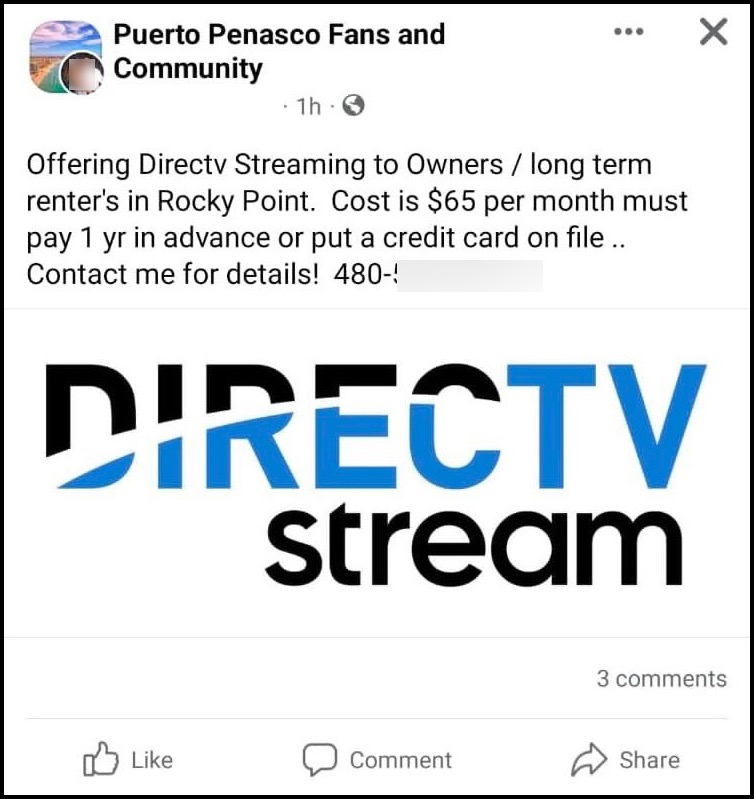
This is a scam. You would not hire and pay another person to set up your Netflix, Hulu, HBO Max, Disney+… you certainly DO NOT need to hire someone to set up DirecTV streaming. Do it yourself and save the $$ for an experience such as taking your loved one on a fishing adventure, a fishing excursion, see the whale migration.
This post will walk you through why you do NOT need help setting up streaming your home country’s shows while traveling abroad / staying in our little slice of heaven in Rocky Point / Puerto Penasco Mexico.
SmartTV
Skip this section if you already know what a SmartTV is.
A SmartTV is a TV that is connected to the internet. Your interaction with a Smart TV is through the apps, which are either preinstalled on the TV or can be downloaded from an app store. There are a wide range of apps from which to choose, although not all apps are available to all OS platforms. In addition, the apps might work differently from one platform to the next (i.e. a Amazon Fire TV does not have the same interface as the Roku TV).
You can use these apps on the SmartTV’s to stream videos, listen to music, play games, watch live newscasts, or browse the internet. For example, apps are available from services such as Netflix, Hulu, Disney+, DirecTV Steam, YouTube, HBO Max, and a wide range of others. Although any supported app can be downloaded for free, most require a paid subscription to use the streaming services.
Streaming Services
DirecTV Stream is a streaming service, same as Netflix, Hulu, Amazon Prime, Apple TV, etc. that you subscribe to online, pay a monthly fee, download an app, and use the service. Installation of physical equipment is not necessary. You do not call someone and hand over your credit card info to set up Netflix, Hulu and the like in the Unites States. Same in Mexico – You absolutely do not help setting up a streaming service, you can do it yourself. You don’t need to hire some random stranger from a FaceBook group to install a “streaming service”.
| WATCH OUT FOR SCAMS: be very wary of anyone offering to help you set up your streaming service. Whatever you do, DO NOT give anyone your credit card or account information – go directly to the source (the streaming service) and set it up. Scams like this are prevalent – I had a DirectTV person steal my credit card number and use it to set up fraudulent accounts. It took a lot of time and energy to report this theft to my bank, DirecTV, and the AZ police department. Not to mention – cancelling the card – waiting for the new one – transfering all auto payments to the new card All said and done in my case, the guy racked up $6k in unauthorized charges. You do NOT want to go through this. So do NOT give your money or credit card number to anyone. |
Now that we have all the warnings out of the way, I’m here to help you set up your VPN (Virtual Private Network) so you can gloriously enjoy your US/Canadian/Italian shows while in Mexico.
DirecTV Streaming
Most of the posts in the Puerto Penasco Facebook groups are offering help with setting up DirecTV streaming service. DirecTV is moving AWAY from their Satellite service and moving their offering to streaming as a way to compete with Netflix, Hulu, Disney, etc.. But most folks that have the old DirecTV Dish are probably not familiar with streaming services in general, and switching from the dish to services may seem scary. It is not. DirecTV Streaming vs. Satellite: What’s the Difference? is a well written article that articulates the difference between the two.
DirecTV Streaming is an app that can be downloaded and is compatible with Amazon Fire TV Stick, Apple TV, Roku, Android TV, Samsung Smart TV, or Chromecast. So basically if you have a Smart TV and/or device, all you have to do is download the DirecTV Stream app and sign in.
I called DirecTV Stream Customer Service (so you don’t have to) to confirm this. If you have multiple locations where you want to stream DirecTV via DirecTV Stream, here are the caveats:
- One home will be listed as a Primary Residence. You can enable as many devices as you want at this location. Example, you live in Phoenix Arizona and have 20 TV’s, download the app and watch DirecTV stream on all of them.
- The second home (location) can have UP TO 3 devices using DirecTV Stream. Example, you have a home/condo in Puerto Penasco that you frequent and want to watch your shows there too.
What this means to you:
- IF you have a primary residence in the States, this will be considered your Primary Home and the DirecTV Streaming service will be “registered” at this location.
- If you live full time in Mexico, you will need to have a USA address to use to set up the DirecTV Streaming service/subscription. This will be considered your primary residence. Why? Because DirecTV Stream services are ONLY available in the USA.
Tech Talk: VPN
If you want to watch your USA shows in Mexico, then you will also need to use a VPN (Virtual Private Network). This is true of ALL streaming services – You cannot access USA streaming service content without a USA IP address. And if you are traveling abroad, you need a VPN service to obtain/use a USA IP. A VPN alters your IP address to the server you’re connected to and makes it seem like you’re browsing from within the USA (sneaky I know).
If you try accessing DirecTV Stream without a VPN, you will be prevented from accessing the streaming service. Others streaming services will offer content of the country you are in. For example, if VPN is NOT enabled, Netflix will show you the content available for the country you are in. Every streaming service is a bit different.
Anyway, my point is, you need is a VPN Service to watch DirecTV Stream in Mexico (or wherever you travel to). Here is what you need to do to get USA content via streaming services like DirectTV while you are in Mexico:
Subscribe, Download, and Install DirecTV Stream
- Sign up for DirecTV Stream service.
- Download and install the DirectTV Stream app on your device.
Subscribe, Download and Install a VPN
I recommend NordVPN – I personally have been using it for years and have never have had a problem. I work full time in Mexico and use the NordVPN app on my laptop for work. My condo in Mexico has 3 TV’s: 2 Smart TVs and 1 TV with a Firestick installed. The TV’s and the Firestick have the NordVPN app installed on it. Currently (as of Dec. 2023), when I turn on any TV, I:
- first go to the NordVPN app, and connect to a USA Server,
- then I go to the streaming service app, i.e. Netflix, Hulu, Prime Video and the content is exactly the same as what I see/watch when I am in the USA.
If you want to go with NordVPN, use my referral link to sign up and get a free month for purchasing a monthly plan OR get 3 months free for a 1-year or 2-year plan purchase. If not, pick any VPN service. Link below gives you a lot of information on the top 3 recommended VPN’s for DirecTV Streaming services (note: NordVPN is on the list).
| For a deep dive into the top 3 VPNs available, go to Best VPN for DIRECTV STREAM Outside US in 2023 |
Installation Options
- Install NordVPN on every single device you want to stream services on.
- Install NordVPN on a wifi router so all devices that use the wifi network will be protected
Currently I have option 1 setup. I have VPN loaded on 3 TVs, my work laptop, mobile phone, etc.. I have to check each of these devices individually to make sure the VPN is enabled before I go to streaming app to watch something. NordVPN is awesome, sometimes it disconnects if there is a long period of zero usage. This is a god thing.
With this said, I will be moving to option 2 below in early 2024 – installing NordVPN on the router. What this will mean is that any device connected to the wifi router is covered. .
For. me, option 2 is better because all the devices would be connected to the wifi router, and I would not have to go to each TV/device and make sure VPN is on. right now I have 6 machines connected to the VPN: 2 tv’s, my computer, my phone, , with option 2, the do not have to figure out if VPN is running/active on every device. on every device iInstructions for both are included below.
Option 2: Install NordVPN on a Wifi Router
This is a GREAT option IF you find the right router with easy setup. This is the best option for your home as ANY device connected to the Wifi network will be protected and able to stream USA content.
These instructions are written on another blog post. You can find all the deets here: Add VPN to ASUS Wifi Router to Watch USA Shows in Mexico
Option 1: Install NordVPN on a Single Device
These instructions work the same with any VPN service you go with and for any/every device:
- Sign up for NordVPN Service.
- Download and install the VPN app on your device.
- Open the app and log in.
- Connect to a VPN server located in the US.
Start Streaming
Now that the installs are done, you will follow these steps over and over for every device you want to stream content. Sometimes when I don’t watch TV that much, the VPN will disconnect (to be expected when it’s not active). Same thing happens with all streaming services, i.e. Netflix, Hulu, etc..
- Go to the VPN app and log in.
- Connect to a VPN server located in the US.
- Go to the DirecTV or any other streaming app and log in.
- Start watching your shows!
And that is it. You should be logged in with DirecTV and see your USA shows.
For step-by-step instructions for installing and using NordVPN and DirecTV together, go to https://vpnalert.com/guides/nordvpn-directv/ .
And thats it. You DO NOT need a person to set this up for you. YOU CAN DO IT. You got this!
Please post any questions in the comments section.

 Paula's Ponderings
What you have written about streaming is very good. My question is: All as I would assume is useable in La Paz, BCS.? I may have understood these terms (tech) before but am so slow today I am not getting to the finish before needing to start over. I will locate a person under 40 to help me complete the set up. I seem to better understand if talking to a person (telephone). Have a computer (Apple) and 3 newer LG 4K televisions. Of course an android Samsung cell phone. Bob Gain 760 884 6533
LikeLiked by 1 person
Hi Bob. Yes, these instructions should apply to anyone that has streaming services based in the USA and wants to watch their services while in another country.
I am happy to help you – the best way for me to help you is to write down your questions and email them to me. This allows me to do the research and get back with you…. If you can send me your questions, I can research them, then give you a a call explaining my responses. You can reach me at paulasponderings@gmail.com.
LikeLiked by 1 person
Great instructions! I am tech challenged and I know I could do it with this information. Thank you for sharing AND warning us of scammers! You’re awesome Paula ❤️
LikeLike
Well, If I need to stream while in Mexico; This is great information. I most likely will be visiting my Daughter and I Know beyond any doubt that she will have it under control. LuvIt & Her!!!!
LikeLiked by 1 person
She will DEFINITELY have you covered.
LikeLike